Celestial Harpy pixel art style Fan Art / Splinterlands Art Contest Week 341 / (ENG/ESP)
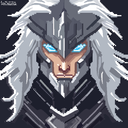

Greetings friends, art lovers and artists, welcome to my publication.
Today I share with you a Fan Art of the Celestial Harpy card from Splinterlands in my participation to the Splinterlands Art Contest Week 341, where I have been inspired by this card because I have seen this type of creature in other action video games where the creatures called Harpies appear, particularly this one is blue and as a card has interesting abilities, then you will be watching the process of creating this Fan Art.
! [Spanish version]
Saludos amigos, amantes del arte y artistas, sean todos bienvenidos a mi publicación.
El día de hoy les comparto un Fan Art de la carta Celestial Harpy de Splinterlands en mi participación al Splinterlands Art Contest Week 341, donde me he inspirado mucho en esta carta debido a que este tipo de criatura la he visto en otros videojuegos de acción donde aparecen las criaturas llamadas Harpías, particularmente esta es de color azul y como carta tiene habilidades interesantes, a continuación estarán observando el proceso de creación de este Fan Art.


First I started my drawing with the sketch of my character, which this style of drawing is about pixel Art, so I created a sketch of how it would be in my style this letter.
You will notice that there are many pixels that are joined with others, and it is for the reason that step by step I will be eliminating these lines that conform the silhouette of my character.
! [Spanish version]
Primero inicie mi dibujo con el boceto de mi personaje, el cual este estilo de dibujo se trata del pixel Art, así que cree un boceto de como sería en mi estilo esta carta.
Notarán que hay muchos píxeles que están unidos con otros, y es por el motivo que paso a paso estaré eliminando estas líneas que conforman la silueta de mi personaje.
 |  |
|---|
In order to eliminate those pixels that make the drawing does not look clean, I had to use some tools that facilitate this step that brings the program I use to draw, but for this, I need not to see all the structure of my character, but only one and then I will work on the other, this way I will not make the process too complicated, so I hide all the layers of each of the structures of my character, that is to say, I create both the hair and the face, wings and clothes of my character in different layers, being a very useful tool to not stress me in the process at the time of drawing.
In this case I was working on the hair layer, so I marked with a red transparent box, all the pixels that are very close to each other and make some lines do not look neat, so once marked all the pixels, which I marked pixel by pixel, delete with the push of a button all the pixels that are marked with red boxes.
You will notice the difference in the image at the bottom of this text of before and after doing this step on my character's hair.
! [Spanish version]
Para poder eliminar esos píxeles que hacen que el dibujo no se vea limpio, he tenido que usar algunas herramientas que me facilitan este paso que trae el programa que uso para dibujar, pero para esto, necesito que no se vean toda la estructura de mi personaje, sino solamente una y después trabajaré en la otra, de esta manera no se me hará muy complicado el proceso, así que oculte todas las capas de cada una de las estructuras de mi personaje, es decir, que cree tanto el cabello como el rostro, alas y ropa de mi personaje en diferentes capas, siendo una herramienta muy útil para no estresarme en el proceso a la hora de dibujar.
En este caso me encontraba trabajando en la capa del cabello, así que marque con un cuadro transparente de color rojo, todos los píxeles que se encuentran muy pegados a otros y hacen que algunas líneas no se aprecien prolijas, así que una vez marcados todos los píxeles, el cual marque pixel por pixel, elimine con solo pulsar un botón todos los píxeles que se encuentran marcados con los cuadros de color rojo.
Notarán la diferencia en la imagen que se encuentra en la parte inferior de este texto del antes y después de hacer este paso en el cabello de mi personaje.
|  |
|---|
|  |
|---|
I repeated the same process with the rest of the silhouette of my character, you will notice him before and him after also in this part, of course, I needed to put a color to the background of my drawing so that the white color of my canvas did not make me much effect on my eyes, since I have problems with the sight with the colors that are very bright, so I added dark green to the background on my canvas.
This part took me about 1 hour to do it, because as I mentioned before, it is about marking pixel by pixel, the squares that are disproportionate in my drawing.
! [Spanish version]
Repetí el mismo proceso con el resto de la silueta de mi personaje, notarán él antes y él después también en esta parte, por supuesto, necesitaba colocarle un color al fondo de mi dibujo para que el color blanco de mi lienzo no me hiciera mucho efecto en mis ojos, ya que tengo problemas con la vista con los colores que son muy llamativos, así que le agregue verde oscuro al fondo en mi lienzo.
Esta parte me tomo al rededor de 1 hora poderla realizar, ya que como mencione anteriormente, se trata de marcar pixel por pixel, los cuadros que se encuentran desproporcionados en mi dibujo.
 |  |
|---|
After I finished cleaning up my drawing a little bit, my next step was to enhance my drawing, so following the colors that my reference image from the Splinterlands card has, I used the same colors like blue for the hair, wings and clothes of my character.
After the previous step, next I started to add some lines that create a little bit the volume of the hair and the wings, the ones on the wings are the feathers of it, small particles that make my drawing have a little more style.
! [Spanish version]
Luego de terminar de limpiar un poco mi dibujo, mi siguiente paso consistía en valorizar mi dibujo, así que siguiendo los colores que tiene mi imagen de referencia de la carta de Splinterlands, use los mismos colores como el azul para el cabello, alas y ropa de mi personaje.
Después del paso anterior, seguidamente comencé a agregar algunas líneas que crean un poco el volumen del cabello y las alas, las que se encuentran en las alas son las plumas del mismo, pequeñas partículas que hacen que tenga un poco más de estilo mi dibujo.
 |  |
|---|
After the previous step, I began to add the depths and shadows of the whole structure of my drawing, starting first with the hair, adding a little darker tones to the base, repeating the same process in the part of the face.
After finishing with the hair and the face, I continued with the same process with the wings and the feather shoulder pads of my character, culminating with the clothes of my person.
In this way I made my drawing and participation of the day, thank you very much for having come this far in my publication, I hope you like it, until next time.
! [Spanish version]
Luego del paso anterior, comencé a agregar las profundidades y sombras de toda la estructura de mi dibujo, comenzando de primero con el cabello, agregando tonos un poco más oscuros al de la base, repitiendo el mismo proceso en la parte del rostro.
Después de terminar con el cabello y el rostro, continúe con el mismo proceso con las alas y las hombreras de pluma de mi personaje, culminando con la ropa de mi persona.
De esta manera hice mi dibujo y participación del día, muchas gracias por haber llegado hasta aquí en mi publicación, espero les sea de su agrado, hasta la próxima.





Discord
LionSaturBix#7545
Los separadores son de mi autoría, las imágenes tienen su fuente, las capturas fueron realizadas en mi perfil de jugador en mi ordenador, las ediciones del GIF son creados por mí.
The separators are of my authorship, the images have their source, the screenshots were made in my player profile on my computer, the GIF edits are created by me.
Programas que utilicé para crear mi diseño es este:
This is the program I used to create my design:
Gif y portada cortesía de Canva
Gif and cover courtesy of Canva
Traducido por Deepl
Herramienta de dibujo, tableta digitalizadora Huion 420 black
Drawing tool, digitizing tablet Huion 420 black
Dibujo realizado en MediBan Paint Pro
Drawing made in MediBan Paint Pro
Stunning!
te quedo muy bien el pixel art